Search the Community
Showing results for tags 'meeting'.
Found 21 results
-
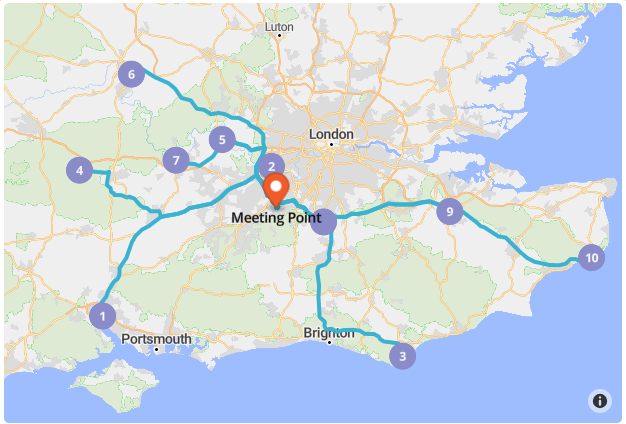
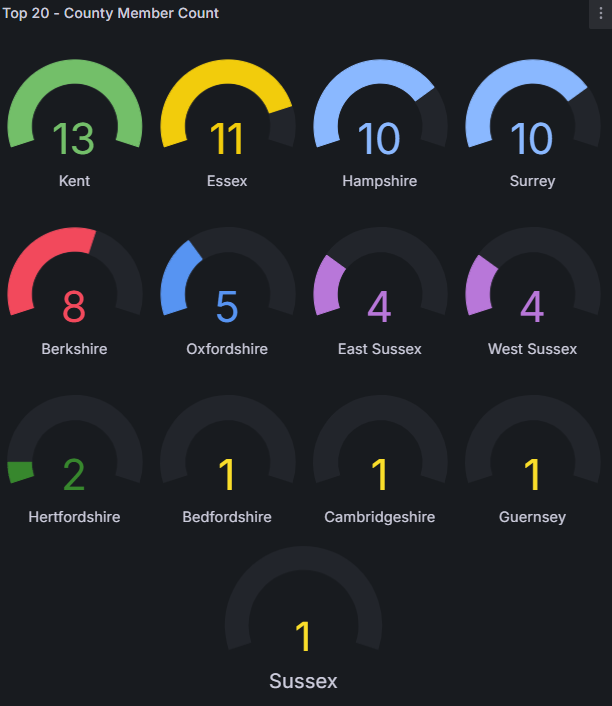
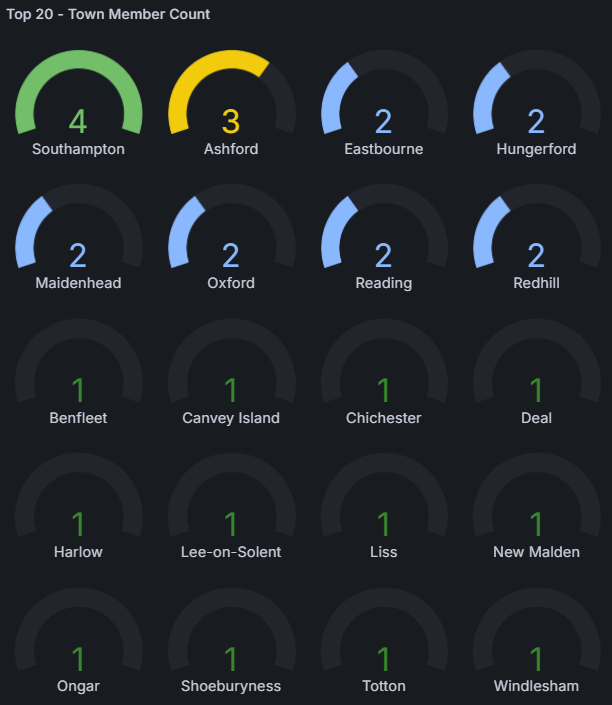
Hello everyone, I've been reviewing the locations of our London & South East area members to find a central spot for our monthly meetings. Below, you’ll find a graph showing the top 20 counties and top 20 towns where most of our members are based. From the data, Cobham in Surrey appears to be a convenient middle ground for the majority of us, as the area is very big. Conveniently, Cobham is located near the M25 (Junctions 9/10), and the nearby services offer a large car park (3 hours free parking) along with plenty of food and drink options — making it an ideal meeting point. UPDATE (29-04-2025) : After popular demand through the forums and questionnaire sent out to members, the meeting location has been changed to: Newland's Corner, Albury, Guildford GU4 8SE You're Invited – Kit Car Club Meetup! We’re kicking off a seasonal monthly meetup for kit car enthusiasts—come along for a relaxed catch-up, car talk, and some good company! Location: Cobham Services (M25, Junction 9/10) Newland's Corner, Albury, Guildford GU4 8SE Easy access from multiple counties 3 hours of free parking When: Every 2nd Sunday of the Month 11:30 AM – 1:30 PM (Spring to Early Autumn – Weather Permitting) Seasonal + Weather-Friendly To keep things comfortable for our open-top beauties, we’ll only meet during Spring, Summer, and early Autumn months—and only when the weather’s good. We’ll post confirmations closer to each date. Who’s it for? Kit car owners and enthusiasts Retirees and weekend cruisers Anyone who enjoys a good drive and good company No RSVP needed – just come along if the sun’s out and you're up for it! We’ll be parked near the main seating area – look for the RHOCaR sign and the kit cars! Stay in touch! WhatsApp Community: https://chat.whatsapp.com/I4W25qfIAYe2DNhyGHeNd4 Telegram Community: https://t.me/+DJyviUgzTkRkYzA0 2025 Kit Car Club Meetup Dates Every 2nd Sunday of the Month | 11:30 AM – 1:30 PM May 11, 2025 June 8, 2025 July 13, 2025 August 10, 2025 September 14, 2025

- 8 replies
-
- 1
-

-
- south east
- london
- (and 2 more)
-
Our December local meeting is changed to Thursday the 15th of December at 7.00pm.We meet at The Old Farmhouse Pub on the outskirts of Darlington (DL2 1JZ).Come along for a chat.
-
Hi All,Our local NE monthly meeting is next Thursday (10th) at The Old Farmhouse pub (DL2 1JZ),Darlington at 7.00 pm.Hope you can make it.
-
Our next 'Local' meeting will be next Thursday the 13th at 7.00pm at The Old Farmhouse Pub near Darlington (DL2 1JZ).Hope to see you there. Cheers
-
Our next monthly meeting will be on Thursday the 15th of September as usual at 7.00 pm at The Old Farmhouse Pub (DL2 1JZ) near Darlington.Hope you can join us. Cheers Mike
-
Our next local meeting is on Thursday next - 11th - at The Old Farmhouse Pub (DL2 1JZ) near Darlington at 7.00 pm.Hope you can join us for a chat.
-
Our next local meeting is at 7.00 pm on Thursday the 14th April at The Old Farmhouse Pub (DL2 1JZ)at Morton Palms on the outskirts of Darlington.Try and make it for a chat.No doubt Stoneleigh will be on the menu.
-
Our local monthly meeting is on this Thursday (17th) as usual at the Old Farmhouse Pub near Darlington (DL2 1JZ) at 7.00 pm.Hope to see you there. Cheers Mike
-
Our local monthly meeting is on this Thursday (18th Feb) at 7.00 pm at The Old Farmhouse Pub near Darlington (DL2 1JZ).All welcome. Cheers Mike
-
What about a lunchtime meeting at the Church Mouse for a change? Let me know who would turn up at 12 noon on Tuesday?
-
Extra Meeting North East Area on Thursday the 10 December 2015 at 7-00 PM. At The Old Farmhouse Pub ( DL2 1JZ) to the East of Darlington which is on the right a short distance along the A67 (Airport road ) from the junction with the A66 Darlington ring road. Hope to see you there. NORMAN.
-
Extra Meeting North East Area on Thursday the 8 October 2015 at 7.00 pm at The Old Farmhouse pub (DL2 1JZ) to the east of Darlington which is on the a short distance along the A67 (Airport road) from the junction with the A66 Darlington ring road. Hope to see you there. NORMAN
-
Extra Meeting North East Area on Thursday the 13 October 2015 at 7.00 pm at The Farmhouse Pub (DL2 1JZ) on the A67 (Airport road ) Darlington. Hope to see you there. NORMAN.
-
Extra Meeting North East Area on Thursday the 9 July 2015 at 7.00 pm at The Old Farmhouse Pub (DL2 1JZ) to the East of Darlington which is on the right a short distance along the A67 (Airport road) from the junction with the A66 Darlington ring road. Hope to see you there. NORMAN.
-
Extra Meeting North East Area on Thursday the 11 June 2015 at 7.00pm at The Old Farmhouse Pub (DL2 1JZ)to the East of Darlington which is on the right a short distance along the A67 (Airport road)from the junction with the A66 Darlington ring road. Hope to see you there. NORMAN.
-
Extra Meeting North East Area on Thursday the 14 May 2015 at 7.00.pm at The Farmhouse Pub (DL2 1JZ) which is on the right a short distance along the A67 (Airport road ) from the junction with the A66 Darlington ring road. Hope to see you there. NORMAN.
-
Extra Meeting North East Area on Thursday the 12 March at 7.00 pm at The Old Farmhouse Pub (DL2 1JZ) to the East of Darlington which is on the right a short distance along the A67 (Airport road ) from the junction with the A66 Darlington ring road. Hope to see you there NORMAN
-
Due to over-running refurbishments, the Malt Shovel will be CLOSED this coming Wednesday 27th November. Therefore for this month only, we will be meeting at The Bulls Head, Meriden CV7 7NN from 7 o'clock onwards. This is a few minutes drive from our usual venue: http://www.thebullsheadmeriden.co.uk/ https://maps.google.co.uk/maps?q=CV7+7NN&hl=en&ll=52.436091,-1.642874&spn=0.001923,0.010772&sll=52.505221,-1.81541&sspn=0.245756,1.378784&oq=cv7+7nn&hnear=CV7+7NN,+United+Kingdom&t=m&z=17 Thanks to Thrashed for pointing out that the Malt Shovel would be closed. Gaz will contact most of our regulars directly, please pass the info on if you think anyone else needs to know.
-
Extra Meeting North East Area on Thursday the 14 November 2013 at 7.00 pm at The Old Farmhouse Pub (DL21JZ) to the East of Darlington which is on the right a short distance along the A67 (airport road ) from the junction with the A66 Darlington ring road. Hope to see you there NORMAN
-
Extra Meeting North East Area on Thursday the 10 October 2013 at 7.00 pm at The Old Farmhouse Pub (DL2 1JZ) on the A67 (Airport road) East of Darlington . Hope to see you there. NORMAN
-
Hi,Just to remind local members that the next meeting in Darlington is on Thursday the 8th of August at 7.00 pm at the Old Farmhouse pub (DL2 1JZ).Food is available if required.Try and get along for a chat/advice etc. Cheers Mike