
Skip to content
View in the app

A better way to browse. Learn more.

The UK Kit Car Club

A full-screen app on your home screen with push notifications, badges and more.

To install this app on iOS and iPadOS
  1. Tap the Share icon in Safari
  2. Scroll the menu and tap Add to Home Screen.
  3. Tap Add in the top-right corner.
To install this app on Android
  1. Tap the 3-dot menu (⋮) in the top-right corner of the browser.
  2. Tap Add to Home screen or Install app.
  3. Confirm by tapping Install.

Cortina based S7

Featured Replies

Hello all,

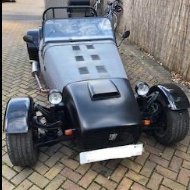
Many cortina based S7’s still out there? Recently bought and set to work refreshing a 1980 cortina based s7, engine (2.0 Pinto) and chassis matching original donor. Rear axle has the fifth link which has just failed. I’ve come across the posts from Chris N describing the micra link fix for axle wind up. Is this still the best fix? What else works? Micra bits not as common these days. 
Any and all help most welcome. Especially if there’s any cortina based s7 build guides out there?! 

E16818FC-482F-4E95-BE2D-E98FB29B0895.thumb.jpeg.7b0a2c6e48f48166a5a2f71416c0ba16.jpeg


D0ED5E2B-8D1B-4A33-94DF-BFCE121A056D.thumb.jpeg.bd8839cc8054e5452d80453615da55b8.jpeg


Thanks,

Mark

  • Author

Today’s find was a small leak from the bottom corner of the petrol tank…so it begins…Start one job, find several more 🙂

C118D828-EEC2-4513-B6BC-536F895827AE.thumb.jpeg.284b10f140e68e3d5ad777c12bdd0386.jpeg

I also had a leak in the petrol tank.

Tank looks just like yours. Leak was actally from a crack in the seam.

I removed tank and emptied it.

Painted aircraft fuel tank sealer round the seams on the inside ( do all seams as leaks travel ) PPG 1440 2 part sealer.

It is expensive but it has held for over 20 years. I got it cheap as it was a couple of days off time expired. Now retired and these expensive solutions might not suit your finances.

  • Author

Good to know thanks Ian. Going to get tank out this weekend and see the extent of it. 

Recently Browsing 0

  • No registered users viewing this page.

Account

Navigation

Search

Search

Configure browser push notifications

Chrome (Android)
  1. Tap the lock icon next to the address bar.
  2. Tap Permissions → Notifications.
  3. Adjust your preference.
Chrome (Desktop)
  1. Click the padlock icon in the address bar.
  2. Select Site settings.
  3. Find Notifications and adjust your preference.