Search the Community
Showing results for tags 'zetec'.
Found 9 results
-
I'm after some advice..... I have a 2B whcih is running a Ford Zetec SE 1600 (Sigma) engine on a Megasquirt MS2 Extra Engine Management System. It has some modified delorto carbs (they are cut in half) acting as ITB's (sort of). It runs ok, and has apparently around 144bhp. Being a Zetec SE, the exhaust exit is on the Off-Side of the car making sourcing a 4-2-1 Manifold to replace the puny 4-1 that is in place difficult, and likely needing a custom fabrication job. So here is the dilemma! Recently I picked up a Zetec S (1700 Puma Engine) for a small amount of money. Its the same bolt pattern, orientation and footprint, but has better internals than the SE, eg Steel crank and rods etc. The original plan was to strip this engine, put some hot cams in it, add some bike ITB's, get some head work done (flow/ported, lifters, springs), and then drop it in as a straight swap with a new beefy 4-2-1 exhaust. The target being around 200bhp. Should I go this route, I can expect to pay £550 for cams, maybe another 200-300 on head work + the cost of a custom exhaust (I already have the ITB's), so maybe 2K all in. However, along the way I picked up a set of GSXR ITB's on an ST170 manifold ready to bolt straight on an ST170 duratec engine (I also have a set of ZXR12 ITB's that are bigger but that would need a manifold, which I intend to design and 3dprint in Carbon reinforced Nylon). So the thing is, given the duratec ST170 engine is the opposite orientation to the S & SE but the same orientation as the Zetec E (Blacktop), eg, "Exhaust on Nearside", there are far more 4-2-1 manifolds available off the shelf (and hopefully second hand) mitigating a potentially expensive custom fab job. Also, being a 2litre engine, with the ITB's and ECU I already have, I am pretty sure 200bhp is achievable without touching the head or opening the engine. Add to that the fact that a decent s/h engine can be had for 300-400 and I could potentially hit the 200bhp target for about 1K, but that excludes any subsequent conversion work I have to do on the gearbox hookup, engine mounts and bodywork. I already plan to strip the car back to the chassis this winter, and therefore the engine is coming out regardless so while the S is an easier job, fitting something different is not a deal breaker. Thoughts, opinions, advice all welcome!
-
Hi, my 1.8 Zetec has died. Anyone out there got a spare one lying about they want rid of. Summer is fast approaching and I cant let her sit this one out. Thanks.
-
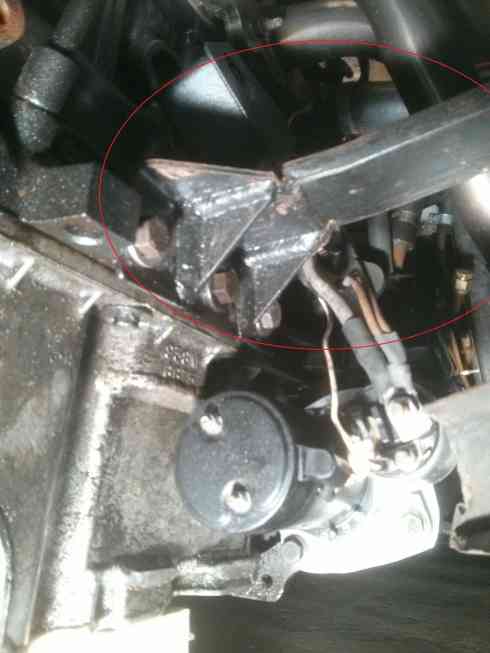
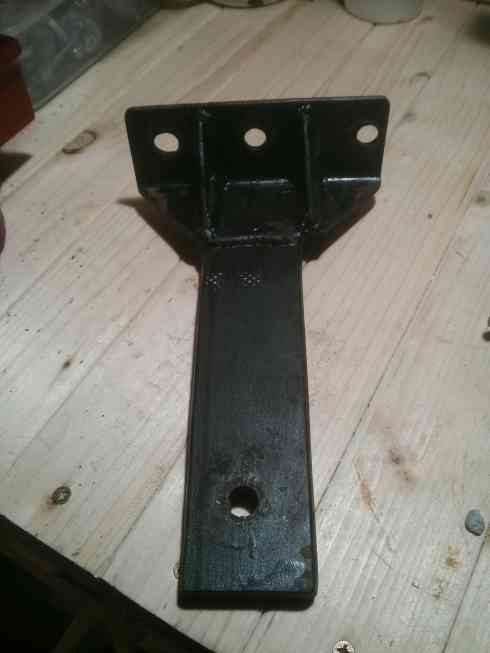
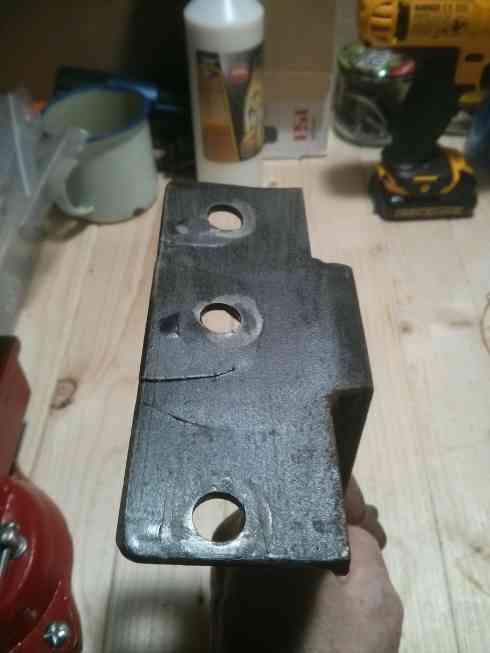
Hi Guys, Does anyone recognise this engine mount and where I can buy another? It fractured when my 2.0l Zetec backfired and I'd rather replace than repair. I've had a good look at the usual sites but not found it. Thanks in advance, Pete

-
I have been fortunate enough to come across Neil Adderidge, who I must say has the most knowledge of Ford Sierra and other historic parts going. For all parts Sierra/Granda/Escort vintage, and what will fit with what, and year. Phone him with your questions or parts you are looking for. Genuine, helpful guy, worth keeping a note of his number 07507683000. He's more than happy to help. I have told him that I would mention him on here? He talked me out of a purchase, and helped me with the clutch pedal issue on my Hood +
-
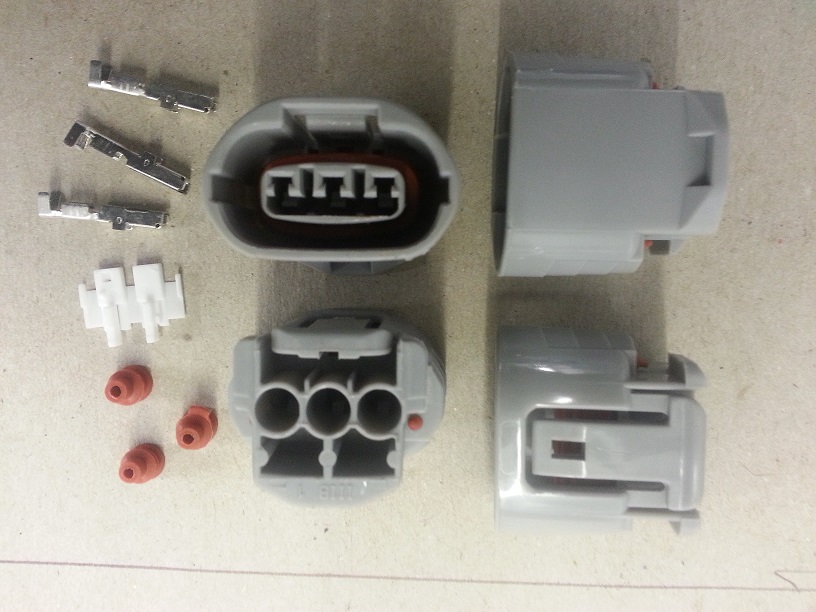
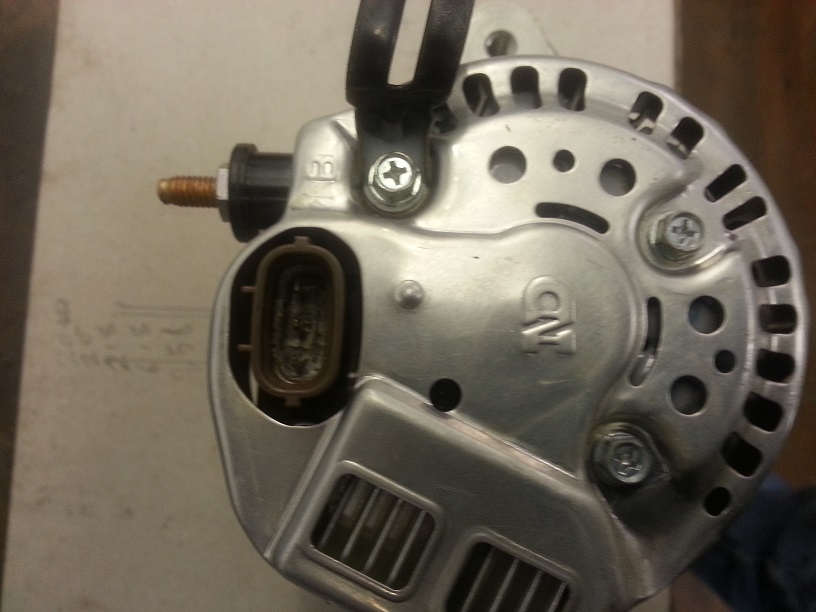
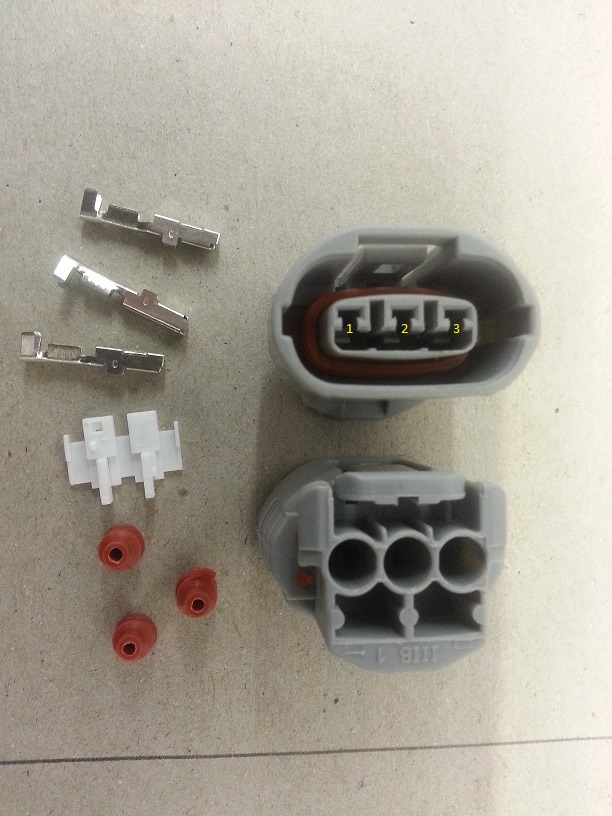
I have a few of these if anyone's interested you can have them as they are for self assembly, or I can make them up with tails to your preferred length and wire colour's. Available colours are: white, red, grey, yellow, black, green, brown/black, green/red, black/yellow, green/black, blue/red. see first photo for your wire colour positioning. I'll be listing them on the bay @ £8.00 for as is or £12.00 with tails. including postage via royal mail 2nd class. as a club discount I'll do them for £6.00 as is or £10.00 with tails. the picture of the alternator is for reference only unfortunately I don't have any of those for sale. please PM me with your order and I'll send my bank details for a bank transfer or my address and you can post me a cheque cheers Ivan
-
Hi I've recently purchased a 2b, Asking for info on the best/easiest engine instal option? The car currently has rear diff and prop to run a 2 litre pinto set up, the engine and gearbox is no longer with the car. My rough thoughts are leaning towards either the 2.0 Zetec or the st170 engine, or possible a vauxhall red top?I know I'm asking for a lot of info but could anyone advise me of options and parts I'll need ie any conversion kits available to get the Zetec in the 2b?, gearbox options? Can I run the standard injection and ecu? Or do I have to switch to bike carbs/throttle bodies, thanks in advance for any info!
-
Hi All, I currenlty have my old stainess steel exhaust for sale on ebay. Happy to provide a 10% discount for any RHOCAR members GBS Robin Hood Zero Exhaust Manifold and Silencer Stainless Steel exhaust manifold and silencer for GBS Robin Hood Zero. Manifold suitable for Zetec Blacktop and Silver top engines. Manifold supplied by GBS (£175+vat new) and 5 inch exhaust Silence includes sports cat £550+vat new). This was made by custom chrome. Used to get car through IVA and used for around 180 miles. I have since replaced for a decat. The silencer and manifold are currently braised together but could be split with a bit of heat if required. May fit other lotus 7 style cars, but please check before you purchase. Viewing welcome by arrangement. We are in Dorking Surrey. PayPal or cash on collection only. Link to ebay can be found here: GBS Robin Hood Zero Exhaust Manifold and Silencer Ford Zetec Also have a few other items for sale: http://www.ebay.co.uk/sch/ethanicus/m.html?item=121007623672&ViewItem=&rt=nc&_trksid=p2047675.l2562 Please let me know if you have any questions. Thanks, Jon
-
I'm part way through the build of a Zero and I'm stuck for a prop shaft. So far GBS have been unable to supply one to me. MT75 box, sierra diff with 2.0l blacktop. Westfield can supply a prop with the following dimensions : The shortest length is 760mm The longest length with the slider fully extended is 810 slider is in the middle. Can anyone tell me if this is a suitable prop? Thanks
-
Hi guys I'm looking for a map for my emerald ecu I have a ported and polished head Kent cams AT throttle body's on a blacktop zetec. It runs on base map but it will be under fueling and I need to run it before I take it to a rolling road. (Unless someone has the same spec and a good map)